⭐ Base
In order to better display the function, the following is an example of the actual scene, please refer to it flexibly.
add-assignees
When an issue is added or modified, assign this issue to one or more people.
name: Add Assignesson:issues:types: [opened, edited]jobs:add-assigness:runs-on: ubuntu-lateststeps:- name: Add assignessuses: actions-cool/issues-helper@v2with:actions: 'add-assignees'token: ${{ secrets.GITHUB_TOKEN }}issue-number: ${{ github.event.issue.number }}assignees: 'xxx' or 'xx1,xx2'random-to: 1
| Param | Desc | Type | Required |
|---|---|---|---|
| actions | Action type | string | ✔ |
| token | Token explain | string | ✔ |
| issue-number | The number of issue. When not input, it will be obtained from the trigger event | number | ✖ |
| assignees | Designated person. No operation when no input or empty character | string | ✖ |
| random-to | When set, it will be randomly selected in assignees | number | ✖ |
actionssupport multiple and separated by comma. Like:add-assignees,add-labels- The
namecan be modified according to the actual situation - Reference to on
${{ github.event.issue.number }}is the current issue. More referencesassigneessupport multiple and separated by comma
add-labels
When the content of a new issue does not contain the specified format, add labels for the issue.
name: Add Labelson:issues:types: [opened]jobs:add-labels:runs-on: ubuntu-latestif: contains(github.event.issue.body, 'xxx') == falsesteps:- name: Add labelsuses: actions-cool/issues-helper@v2with:actions: 'add-labels'token: ${{ secrets.GITHUB_TOKEN }}issue-number: ${{ github.event.issue.number }}labels: 'bug' or 'xx1,xx2'
| Param | Desc | Type | Required |
|---|---|---|---|
| actions | Action type | string | ✔ |
| token | Token explain | string | ✔ |
| issue-number | The number of issue. When not input, it will be obtained from the trigger event | number | ✖ |
| labels | New labels. When it is not filled in or is empty character, do not add | string | ✖ |
labelssupport multiple and separated by comma
close-issue
Close the specified issue.
- name: Close issueuses: actions-cool/issues-helper@v2with:actions: 'close-issue'token: ${{ secrets.GITHUB_TOKEN }}issue-number: xxx
| Param | Desc | Type | Required |
|---|---|---|---|
| actions | Action type | string | ✔ |
| token | Token explain | string | ✔ |
| issue-number | The number of issue. When not input, it will be obtained from the trigger event | number | ✖ |
create-comment
When a designated label is added, comment on the issue.
name: Create Commenton:issues:types: [labeled]jobs:create-comment:runs-on: ubuntu-latestif: github.event.label.name == 'xxx'steps:- name: Create commentuses: actions-cool/issues-helper@v2with:actions: 'create-comment'token: ${{ secrets.GITHUB_TOKEN }}issue-number: ${{ github.event.issue.number }}body: |Hello @${{ github.event.issue.user.login }}. Add some comments.你好 @${{ github.event.issue.user.login }}。巴拉巴拉。contents: '+1' or '+1,heart'
| Param | Desc | Type | Required |
|---|---|---|---|
| actions | Action type | string | ✔ |
| token | Token explain | string | ✔ |
| issue-number | The number of issue. When not input, it will be obtained from the trigger event | number | ✖ |
| body | Add comment content | string | ✖ |
| contents | Add reaction | string | ✖ |
bodydefault isCurrently at ${owner}/${repo}. And this is default comment.- Where
${owner}/${repo}means the current repo
- Where
- Return
comment-id, which can be used for subsequent operations. Usage reference ${{ github.event.issue.user.login }}indicates the creator of the issuecontentssupport multiple and separated by comma
create-issue
Here is an example, add an issue at UTC 00:00 on the 1st of every month.
name: Create Issueon:schedule:- cron: "0 0 1 * *"jobs:create-issue:runs-on: ubuntu-lateststeps:- name: Create issueuses: actions-cool/issues-helper@v2with:actions: 'create-issue'token: ${{ secrets.GITHUB_TOKEN }}title: 'xxxx'body: 'xxxx'labels: 'xx'assignees: 'xxx'contents: '+1'
| Param | Desc | Type | Required |
|---|---|---|---|
| actions | Action type | string | ✔ |
| token | Token explain | string | ✔ |
| title | The title of the new issue | string | ✖ |
| body | The body of the new issue | string | ✖ |
| labels | The labels for the new issue | string | ✖ |
| assignees | The assignees for the new issue | string | ✖ |
| random-to | When set, it will be randomly selected in assignees | number | ✖ |
| contents | Add reaction | string | ✖ |
titledefault isDefault Title- Return
issue-number. Usage reference
create-label
Create label. If you want to maintain labels in batches, see.
- name: Create labeluses: actions-cool/issues-helper@v2with:actions: 'create-label'token: ${{ secrets.GITHUB_TOKEN }}label-name: 'xx'label-color: '0095b3'label-desc: 'xx'
| Param | Desc | Type | Required |
|---|---|---|---|
| actions | Action type | string | ✔ |
| token | Token explain | string | ✔ |
| label-name | Label name, emoji support | string | ✔ |
| label-color | Label color, the format is hexadecimal color code, without # | string | ✖ |
| label-desc | Label description | string | ✖ |
label-name: If it already exists, no operationlabel-color: Default isededed
delete-comment
According to comment-id delete the specified comment.
- name: Delete commentuses: actions-cool/issues-helper@v2with:actions: 'delete-comment'token: ${{ secrets.GITHUB_TOKEN }}comment-id: xxx
| Param | Desc | Type | Required |
|---|---|---|---|
| actions | Action type | string | ✔ |
| token | Token explain | string | ✔ |
| comment-id | The comment ID | number | ✔ |
| out-comments | The output of find-comments, if you find multiple, operate multiple | string | ✖ |
- When
out-commentsis entered,comment-iddoes not work
lock-issue
When the invalid label is added, the issue is locked.
name: Lock Issueon:issues:types: [labeled]jobs:lock-issue:runs-on: ubuntu-latestif: github.event.label.name == 'invalid'steps:- name: Lock issueuses: actions-cool/issues-helper@v2with:actions: 'lock-issue'token: ${{ secrets.GITHUB_TOKEN }}issue-number: ${{ github.event.issue.number }}
| Param | Desc | Type | Required |
|---|---|---|---|
| actions | Action type | string | ✔ |
| token | Token explain | string | ✔ |
| issue-number | The number of issue. When not input, it will be obtained from the trigger event | number | ✖ |
| lock-reason | Reason for locking issue | string | ✖ |
lock-reason: Optional values areoff-topictoo heatedresolvedspam
mark-duplicate
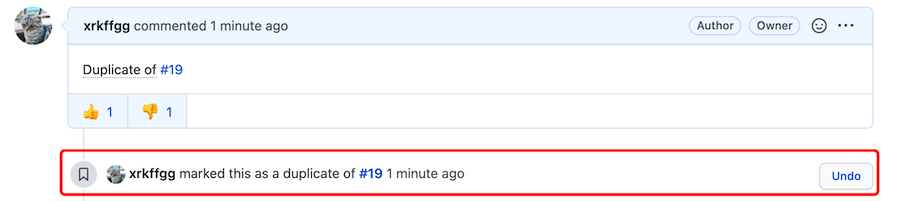
Quickly mark duplicate questions, only for issue new comments or edit comments.
name: Issue Mark Duplicateon:issue_comment:types: [created, edited]jobs:mark-duplicate:runs-on: ubuntu-lateststeps:- name: mark-duplicateuses: actions-cool/issues-helper@v2with:actions: 'mark-duplicate'token: ${{ secrets.GITHUB_TOKEN }}
| Param | Desc | Type | Required |
|---|---|---|---|
| actions | Action type | string | ✔ |
| token | Token explain | string | ✔ |
| duplicate-command | Simple commands can be set, such as: /d | string | ✖ |
| duplicate-labels | Add additional labels to this issue | string | ✖ |
| remove-labels | Set removable labels | string | ✖ |
| labels | Replace the labels of the issue | string | ✖ |
| contents | Add reaction for this comment | string | ✖ |
| close-issue | Whether to close the issue at the same time | string | ✖ |
| require-permission | Permission required, default is write | string | ✖ |
duplicate-command: When setting concise commands, while still supporting the originalDuplicate of. Block content contains?labels: Highest priorityclose-issue: Bothtrueor'true'can take effectrequire-permission: Optional values areadmin,write,read,none- If the team member sets the
readpermission, it isread - If the external Collaborator is set to
readpermission, it isread - Ordinary users have
readpermission - When set
write,adminandwritemeet the conditions
- If the team member sets the
open-issue
Open the specified issue.
- name: Open issueuses: actions-cool/issues-helper@v2with:actions: 'open-issue'token: ${{ secrets.GITHUB_TOKEN }}issue-number: xxx
| Param | Desc | Type | Required |
|---|---|---|---|
| actions | Action type | string | ✔ |
| token | Token explain | string | ✔ |
| issue-number | The number of issue. When not input, it will be obtained from the trigger event | number | ✖ |
remove-assignees
Remove the person designated by issue.
- name: Remove assigneesuses: actions-cool/issues-helper@v2with:actions: 'remove-assignees'token: ${{ secrets.GITHUB_TOKEN }}issue-number: ${{ github.event.issue.number }}assignees: 'xx'
| Param | Desc | Type | Required |
|---|---|---|---|
| actions | Action type | string | ✔ |
| token | Token explain | string | ✔ |
| issue-number | The number of issue. When not input, it will be obtained from the trigger event | number | ✖ |
| assignees | Designated person removed. When it is an empty character, do not remove | string | ✔ |
remove-labels
Remove the specified labels.
- name: Remove labelsuses: actions-cool/issues-helper@v2with:actions: 'remove-labels'token: ${{ secrets.GITHUB_TOKEN }}issue-number: ${{ github.event.issue.number }}labels: 'xx'
| Param | Desc | Type | Required |
|---|---|---|---|
| actions | Action type | string | ✔ |
| token | Token explain | string | ✔ |
| issue-number | The number of issue. When not input, it will be obtained from the trigger event | number | ✖ |
| labels | The removed labels. When it is a blank character, do not remove | string | ✔ |
labelssupports multiple, such asx1,x2,x3, only the labels added by the issue will be removed
set-labels
Replace the labels of issue.
- name: Set labelsuses: actions-cool/issues-helper@v2with:actions: 'set-labels'token: ${{ secrets.GITHUB_TOKEN }}issue-number: ${{ github.event.issue.number }}labels: 'xx'
| Param | Desc | Type | Required |
|---|---|---|---|
| actions | Action type | string | ✔ |
| token | Token explain | string | ✔ |
| issue-number | The number of issue. When not input, it will be obtained from the trigger event | number | ✖ |
| labels | labels set. When empty characters, will remove all | string | ✔ |
unlock-issue
Unlock the specified issue.
- name: Unlock issueuses: actions-cool/issues-helper@v2with:actions: 'unlock-issue'token: ${{ secrets.GITHUB_TOKEN }}issue-number: ${{ github.event.issue.number }}
| Param | Desc | Type | Required |
|---|---|---|---|
| actions | Action type | string | ✔ |
| token | Token explain | string | ✔ |
| issue-number | The number of issue. When not input, it will be obtained from the trigger event | number | ✖ |
update-comment
Update the specified comment according to comment-id.
The following example shows that 👀 is added for each new comment.
name: Add eyes to each commenton:issue_comment:types: [created]jobs:update-comment:runs-on: ubuntu-lateststeps:- name: Update commentuses: actions-cool/issues-helper@v2with:actions: 'update-comment'token: ${{ secrets.GITHUB_TOKEN }}comment-id: ${{ github.event.comment.id }}contents: 'eyes'
| Param | Desc | Type | Required |
|---|---|---|---|
| actions | Action type | string | ✔ |
| token | Token explain | string | ✔ |
| comment-id | The comment ID | number | ✔ |
| out-comments | The output of find-comments, if you find multiple, operate multiple | string | ✖ |
| body | Update the content of comment | string | ✖ |
| update-mode | Update mode. Default replace, another append | string | ✖ |
| contents | Add reaction | string | ✖ |
- When
bodyis not entered, it will remain as it is - When
update-modeisappend, additional operations will be performed. Anything other thanappendwill be replaced. Only effective forbody - When
out-commentsis entered,comment-iddoes not work
update-issue
Update the specified issue according to the issue-number.
- name: Update issueuses: actions-cool/issues-helper@v2with:actions: 'update-issue'token: ${{ secrets.GITHUB_TOKEN }}issue-number: ${{ github.event.issue.number }}state: 'open'title: 'xxx'body: 'xxxx'update-mode: 'replace'labels: 'xx'assignees: 'xxx'contents: '+1'
| Param | Desc | Type | Required |
|---|---|---|---|
| actions | Action type | string | ✔ |
| token | Token explain | string | ✔ |
| issue-number | The number of issue. When not input, it will be obtained from the trigger event | number | ✖ |
| state | Modify the status of issue, optional value open closed | string | ✖ |
| title | Modify the title of the issue | string | ✖ |
| body | Modify the content of issue | string | ✖ |
| update-mode | Update mode. Default replace, another append | string | ✖ |
| labels | Replace the labels of issue | string | ✖ |
| assignees | Replace the assignees of issue | string | ✖ |
| contents | Add reaction | string | ✖ |
statedefaults toopen- When the option is not filled, it will keep the original
welcome
When an issue is created, the user who created the issue for the first time is welcome.
If the user is not creating for the first time, there is no operation.
name: Issue Welcomeon:issues:types: [opened]jobs:issue-welcome:runs-on: ubuntu-lateststeps:- name: welcomeuses: actions-cool/issues-helper@v2with:actions: 'welcome'token: ${{ secrets.GITHUB_TOKEN }}body: hi @${{ github.event.issue.user.login }}, welcome!labels: 'welcome1, welcome2'assignees: 'xx1'issue-contents: '+1, -1, eyes'
| Param | Desc | Type | Required |
|---|---|---|---|
| actions | Action type | string | ✔ |
| token | Token explain | string | ✔ |
| body | Comment on the welcome content, no comment if you leave it blank | string | ✖ |
| labels | Add labels to this issue | string | ✖ |
| assignees | Add assignees to this issue | string | ✖ |
| issue-contents | Add reaction to this issue | string | ✖ |
- If these 4 options are not filled, no operation